8.2.1 使用 Spring Boot 引导响应式应用程序
你可以从 Spring Initializr(https://start.spring.io)初始化 Order Service 项目,将结果存储到新的 order-service Git 仓库中,并推送到 GitHub。初始化参数如图 8.5 所示。
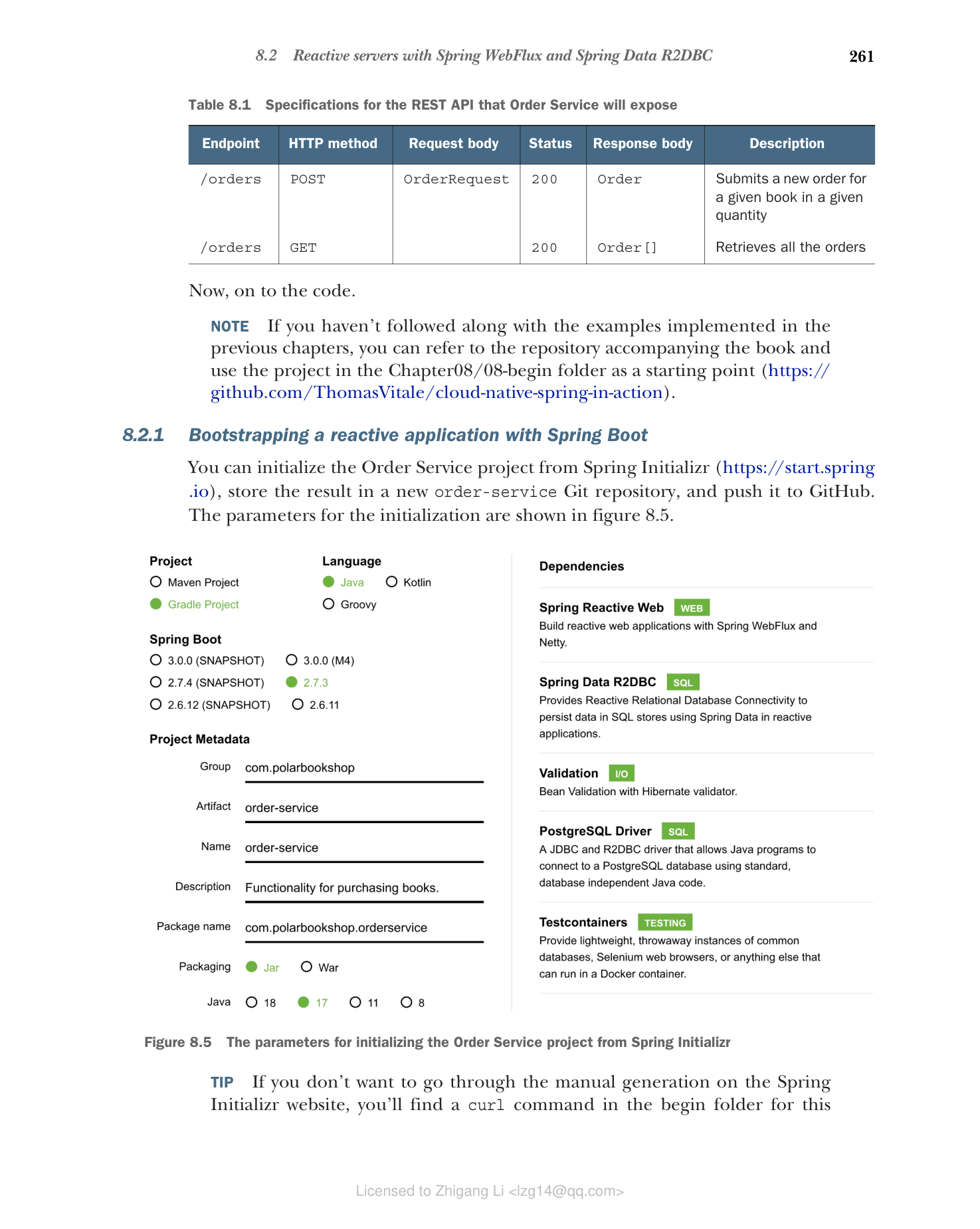
图 8.5 从 Spring Initializr 初始化 Order Service 项目的参数
提示: 如果你不想在 Spring Initializr 网站上手动生成,可以在本章的 begin 文件夹中找到一个 curl 命令,可以在终端窗口中运行以下载 zip 文件。它包含你需要的所有代码。
自动生成的 build.gradle 文件的依赖部分如下:
dependencies {
 implementation 'org.springframework.boot:spring-boot-starter-data-r2dbc'
 implementation 'org.springframework.boot:spring-boot-starter-validation'
 implementation 'org.springframework.boot:spring-boot-starter-webflux'
 runtimeOnly 'org.postgresql:r2dbc-postgresql'
 testImplementation 'org.springframework.boot:spring-boot-starter-test'
 testImplementation 'io.projectreactor:reactor-test'
 testImplementation 'org.testcontainers:junit-jupiter'
 testImplementation 'org.testcontainers:postgresql'
 testImplementation 'org.testcontainers:r2dbc'
}
这些是主要依赖:
- Spring Reactive Web(org.springframework.boot:spring-boot-starter-webflux)——提供使用 Spring WebFlux 构建响应式 Web 应用程序所需的库,并包含 Netty 作为默认嵌入式服务器。
- Spring Data R2DBC(org.springframework.boot:spring-boot-starter-data-r2dbc)——提供在响应式应用程序中使用 R2DBC 通过 Spring Data 将数据持久化到关系数据库所需的库。
- Validation(org.springframework.boot:spring-boot-starter-validation)——提供使用 Java Bean Validation API 进行对象验证所需的库。
- PostgreSQL(org.postgresql:r2dbc-postgresql)——提供允许应用程序响应式连接到 PostgreSQL 数据库的 R2DBC 驱动程序。
- Spring Boot Test(org.springframework.boot:spring-boot-starter-test)——提供多个用于测试应用程序的库和工具,包括 Spring Test、JUnit、AssertJ 和 Mockito。它会自动包含在每个 Spring Boot 项目中。
- Reactor Test(io.projectreactor:reactor-test)——提供用于测试基于 Project Reactor 的响应式应用程序的工具。它会自动包含在每个响应式 Spring Boot 项目中。
- Testcontainers(org.testcontainers:junit-jupiter、org.testcontainers:postgresql、org.testcontainers:r2dbc)——提供使用轻量级 Docker 容器测试应用程序所需的库。特别是,它提供了支持 R2DBC 驱动程序的 PostgreSQL 测试容器。
Spring Boot 中响应式应用程序的默认和推荐嵌入式服务器是 Reactor Netty,它构建在 Netty 之上,以在 Project Reactor 中提供响应式能力。你可以通过属性或定义 WebServerFactoryCustomizer
首先,将 Spring Initializr 生成的 application.properties 文件重命名为 application.yml,并使用 spring.application.name 属性定义应用程序名称。就像你为 Tomcat 所做的那样,你可以通过 server.port 属性定义服务器端口,通过 server.shutdown 配置优雅关闭,并使用 spring.lifecycle.timeout-per-shutdown-phase 设置宽限期。使用特定的 Netty 属性,你可以进一步自定义服务器的行为。例如,你可以使用 server.netty.connection-timeout 和 server.netty.idle-timeout 属性为 Netty 定义连接和空闲超时。
代码清单 8.1 配置 Netty 服务器和优雅关闭
server:
 port: 9002 # 服务器接受连接的端口
 shutdown: graceful # 启用优雅关闭
 netty:
 connection-timeout: 2s # 与服务器建立 TCP 连接的等待时间
 idle-timeout: 15s # 如果没有数据传输,关闭 TCP 连接前的等待时间

spring:
 application:
 name: order-service
 lifecycle:
 timeout-per-shutdown-phase: 15s # 定义 15 秒的宽限期
有了这个基本设置,我们现在可以定义域实体及其持久化。